PMDesk

macOS app for people who direct AI agentsAI エージェントを指揮する人のための macOS アプリ

Many agents.Many projects.One desk.エージェントは何体でも。プロジェクトはいくつでも。デスクはひとつ。

PMDesk is the project cockpit for AI-driven development: docs, questions, tasks and agent sessions in one place. You read, decide and answer. The agents do the work.PMDesk は AI駆動開発のプロジェクト・コックピット。資料・質問・タスク・エージェントを一か所で。読んで、決めて、答えるのはあなた。手を動かすのはエージェントです。

Works with Claude Code & CodexClaude Code / Codex 対応Data stays on your machineデータはパソコンの中だけOne-time license買い切りライセンス日本語 / English

Windows: coming soonWindows 版は準備中です

Try it — click anything触ってみてください

Sessionsセッション

  • Requirements draft要件定義書のドラフトrunning実行中
  • API reviewAPI レビューwaiting for answer回答待ち
  • Test planテスト計画finished完了

Q&A

What is the external API rate limit?外部 API のレート制限は?Waiting for your answerあなたの回答を待っています

Tasksタスク

done完了 0/3

Agent log (demo)エージェントログ(デモ)

  • 10:06:41 plantask board updated from the plan計画からタスクボードを更新
  • 10:06:55 docrequirements.md → 3 comments addedrequirements.md → コメント 3 件
  • 10:07:02 sessionclaude · Order Management → runningclaude · Order Management → 実行中
  • 10:07:14 qaagent filed a questionエージェントが質問を登録
  • 10:07:23 sessionclaude · API review → waiting for answerclaude · API review → 回答待ち

In parallel同時実行

5

agent sessions running in the background at onceバックグラウンドで同時に動かせるエージェントのセッション

Agents対応エージェント

2

supported: Claude Code and CodexClaude Code と Codex に対応

Uploadedアップロード

0B

of project data sent to a PMDesk server. It stays on your machine.プロジェクトのデータは PMDesk のサーバーに送られません。パソコンの中だけです。

Languages言語

2

日本語 / English日本語 / English

What’s in the box機能一覧

Everything you need to direct the work.指揮するために必要なものを、ひとつに。

01

Every session, every projectすべてのプロジェクトの、すべてのセッション

One tab per project, with Claude Code or Codex running in each terminal. Sessions keep running in the background (up to 5 at once), and you can resume from history, rename or archive them.プロジェクトごとにタブを分け、ターミナルでは Claude Code か Codex が動きます。セッションはバックグラウンドで動き続け(同時に最大 5 つ)、履歴からの再開、名前の変更、アーカイブもできます。

sessionsterminalclaude · codex
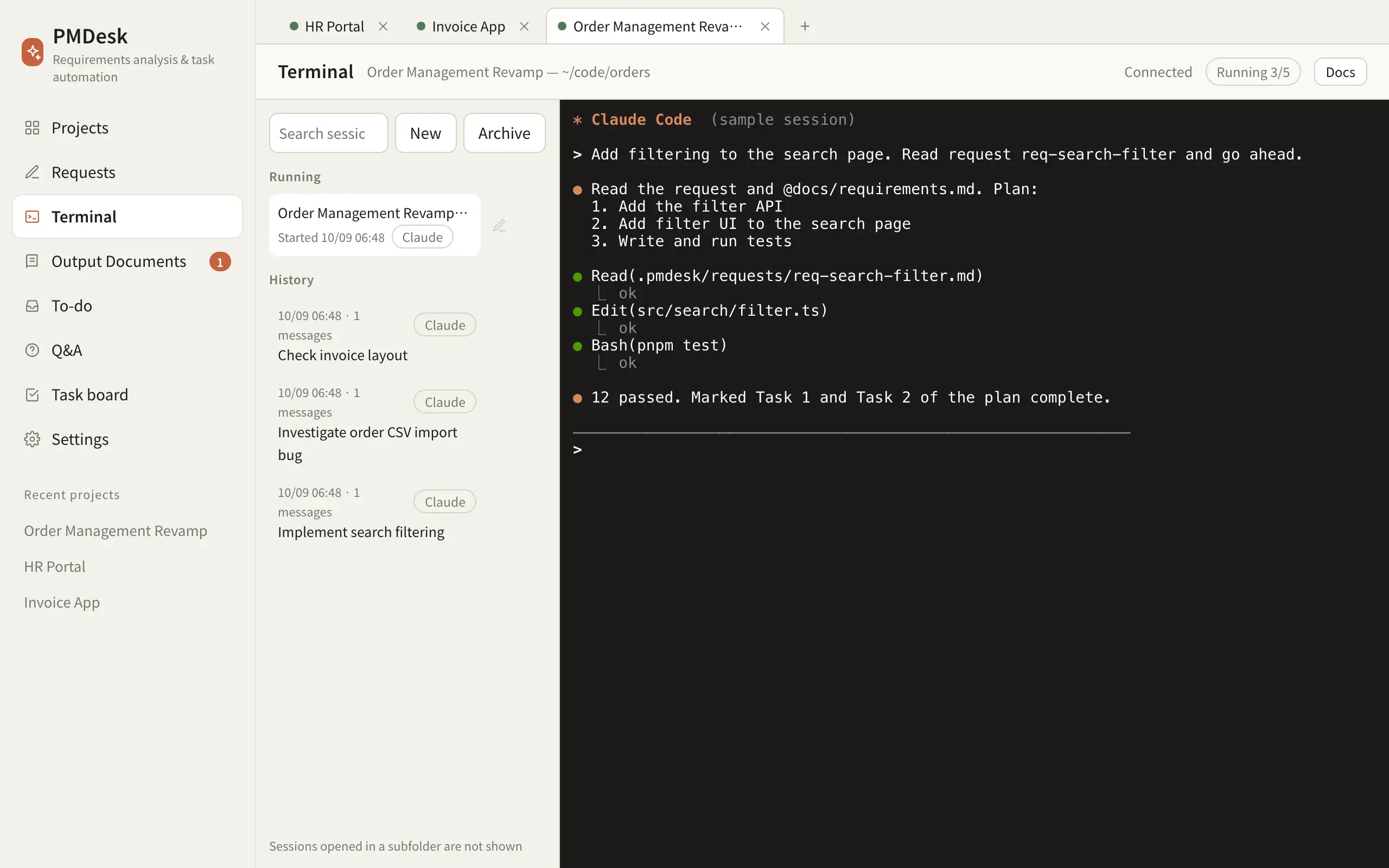
PMDesk terminal page: project tabs on top, running and past sessions on the left, an agent session on the right

02

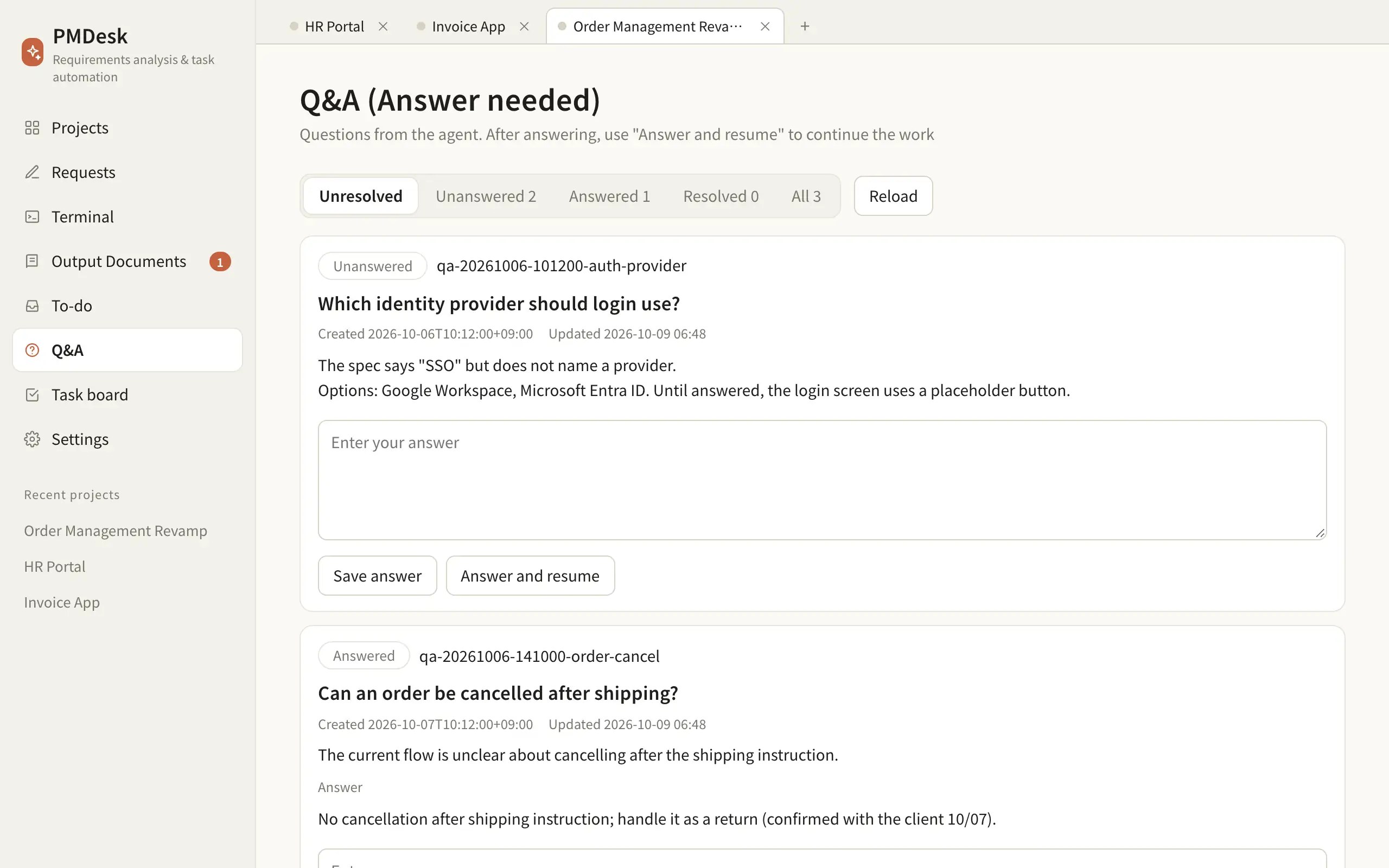
The agent asks. You answer.エージェントが聞き、あなたが答える

When the agent is unsure it files a question instead of guessing. Answer in PMDesk and press “Answer and resume” to continue the same session. Todo keeps what needs a human decision.エージェントは迷ったとき、推測せずに質問を残します。PMDesk で答えて「回答して再開」を押すと、同じセッションで作業が続きます。Todo には人の判断が必要なことが集まります。

Q&Atodoanswer & resume
Q&A page with two unanswered questions and answer boxes

03

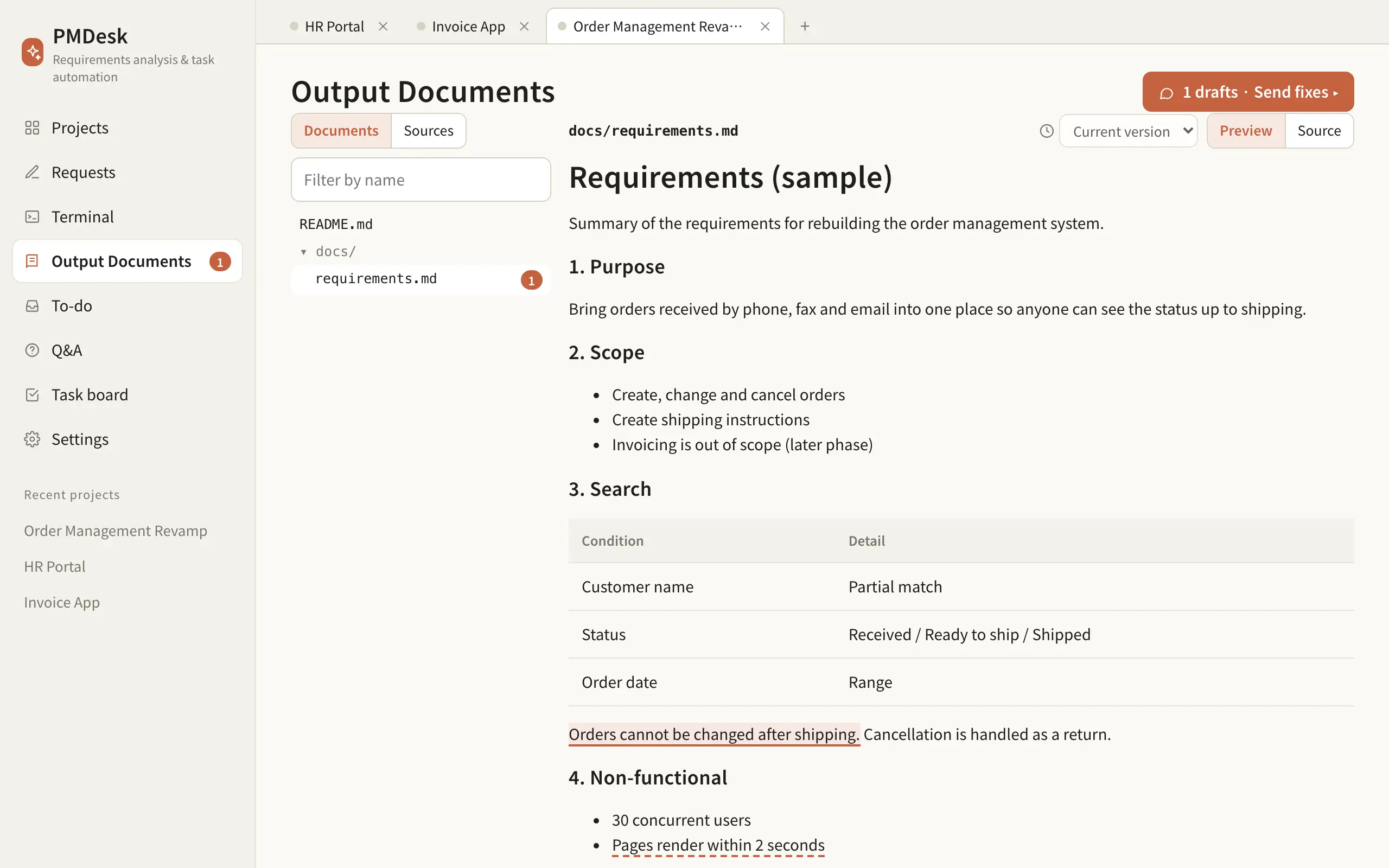
Client document folders顧客資料フォルダ

Register Box, Google Drive, OneDrive, iCloud or any folder. Browse it inside PMDesk and let the agent read it from where it is. PMDesk itself never writes there.Box・Google Drive・OneDrive・iCloud や任意のフォルダを登録。PMDesk 上で閲覧でき、エージェントも今の場所から読めます。PMDesk 自身は書き込みません。

BoxGoogle DriveOneDriveiCloud
A registered client document folder listing its files

04

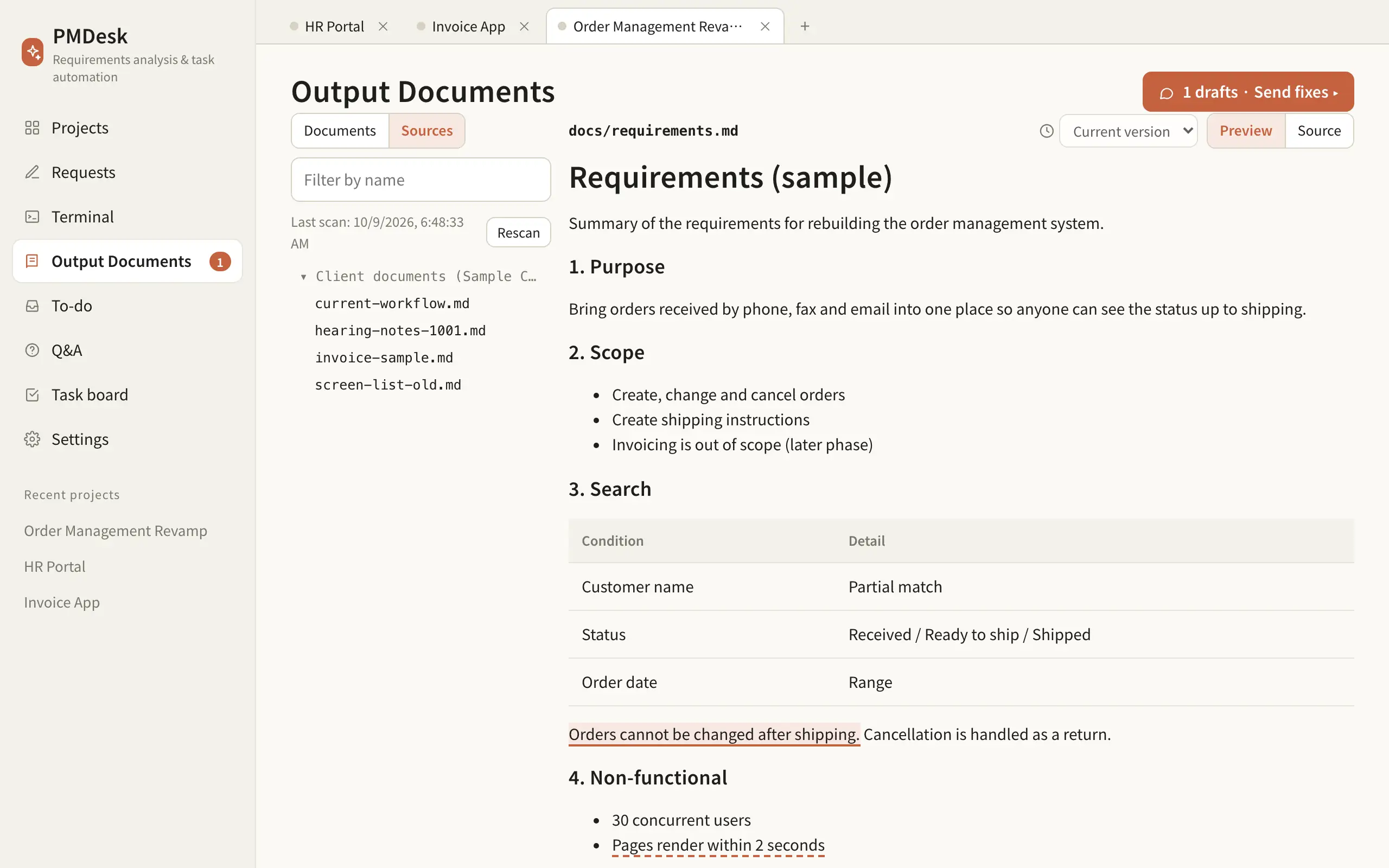
Review that reaches the agentエージェントに届くレビュー

Read the Markdown and HTML the agent produces, select a passage, leave a comment, and send all the fixes to the agent at once.エージェントが作った Markdown / HTML を読み、気になる箇所を選んでコメントし、修正依頼をまとめてエージェントに送れます。

outputsmarkdownhtmlcomments
Outputs page showing a requirements document with highlighted commented passages

05

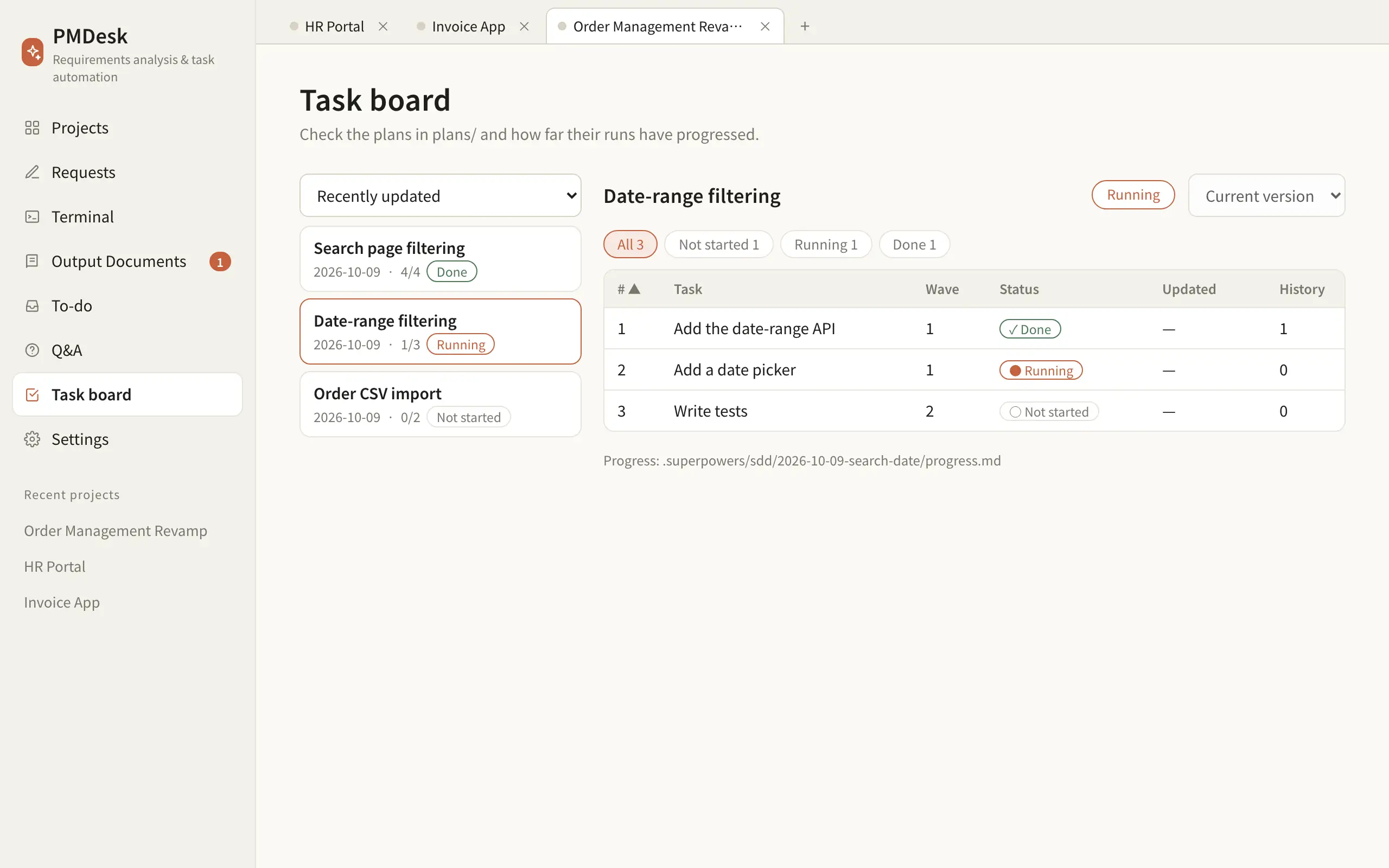
A task board built from your plans計画から作るタスクボード

Plans written by the agent become a board: tasks, waves, and what is done or running. No manual status updates.エージェントが書いた計画がそのままボードになり、タスク・Wave・完了/実行中が分かります。手作業での更新は不要です。

task boardplanswaves
Task board listing three plans and the tasks of one plan with their status

06

Requests and change requests要求とコメント(CR)

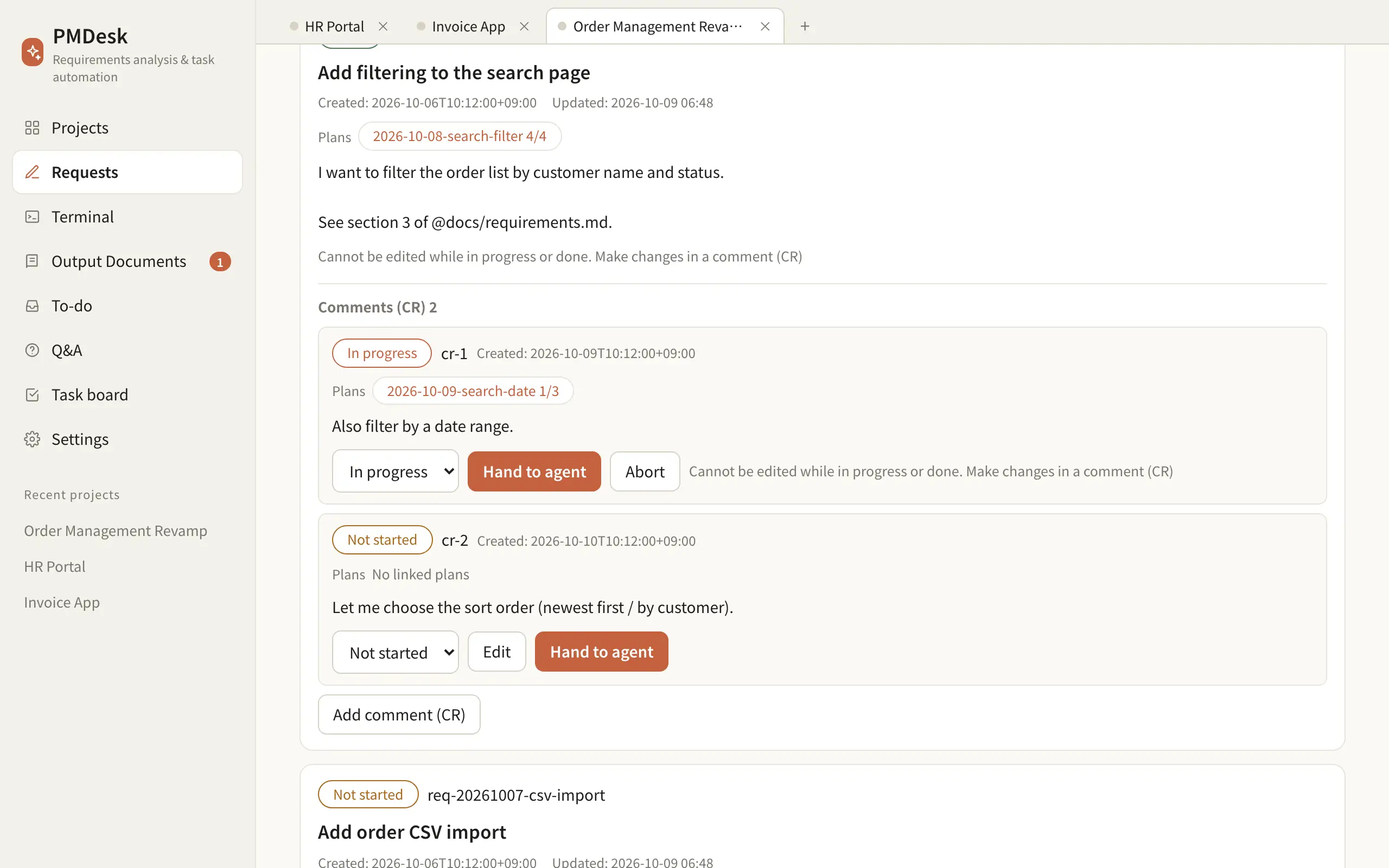
Write what you want done, then hand it to the running session in one click (you press Enter to send). Later changes become CRs, each linked to its own plan and progress.やりたいことを書き、ワンクリックで実行中のセッションの入力欄へ渡します(送信は自分で Enter)。後からの変更は CR として、計画と進み具合に紐づけて追えます。

requestsCRhand over
Requests page showing a finished request with two change requests, each linked to a plan

Who it is forこんな方に

Built for the person directing the agents.エージェントを「指揮する人」のために。

Project leadsプロジェクトリード

Running several projects with Claude Code at once複数のプロジェクトを Claude Code で同時に進める人

See every session, open question and plan in one window, instead of hunting through terminals.ターミナルを探し回る代わりに、セッション・未回答の質問・計画を 1 つの画面で見渡せます。

FDE / contract developmentFDE / 受託開発

Working from client documents顧客資料をもとに開発する人

Read the client’s documents, collect questions, answer them and resume the agent. Client files stay where they are.顧客資料を読み、質問をためて、回答してエージェントを再開。顧客のファイルは今の場所のままです。

PMs and reviewersPM・レビュアー

Involved, but not codingコードは書かないが関わる人

No terminal needed: read documents, comment, answer questions and check progress.ターミナルは不要。資料を読み、コメントし、質問に答え、進み具合を確認できます。

Privacyプライバシー

Your project data stays on your machine.プロジェクトのデータは、あなたのパソコンの中だけ。

Files, documents, requests, questions and session history are stored in your project folder. PMDesk has no server that receives them.ファイル・資料・要求・質問・セッション履歴はプロジェクトのフォルダに保存され、PMDesk のサーバーには届きません。

  • Stored in your project folder, not on a PMDesk server.保存先はプロジェクトのフォルダ。PMDesk のサーバーではありません。
  • You use your own Claude Code or Codex subscription. PMDesk includes no AI model.Claude Code / Codex はご自身の契約でお使いください。PMDesk に AI モデルは含まれません。
  • Only your account and licence status are handled online.オンラインで扱うのは、アカウントとライセンスの状態だけです。

FAQ

Questions.よくある質問

Where does my project data go?プロジェクトのデータはどこに保存されますか?

It stays on your machine. PMDesk is a desktop app: your project files, documents, requests, questions and session history live in the project folder and are never uploaded to a PMDesk server. Only your account and licence status are handled online.

The agent you use (Claude Code or Codex) sends its prompts to its own provider, under your own subscription and that provider’s terms.

お使いのパソコンの中だけです。PMDesk はデスクトップアプリで、プロジェクトのファイル・資料・要求・質問・セッション履歴はプロジェクトのフォルダに保存され、PMDesk のサーバーには送信されません。オンラインで扱うのはアカウントとライセンスの状態だけです。

エージェント(Claude Code / Codex)が送るプロンプトは、お客様ご自身の契約のもと、各提供元の規約に従って提供元に送られます。

Do I need my own Claude Code or Codex subscription?Claude Code や Codex の契約は別に必要ですか?

Yes. PMDesk does not include any AI model. It runs the claude or codex command you have already installed and signed in to.

必要です。PMDesk には AI モデルは含まれません。すでにインストールしてログイン済みの claude / codex コマンドを起動して使います。

Does PMDesk change my clients’ documents?PMDesk は顧客の資料を書き換えますか?

No. PMDesk only reads registered document folders. The agent can write there, so the default instructions tell it to ask before deleting, overwriting or moving anything.

いいえ。PMDesk は登録した資料フォルダを読むだけです。エージェントは書き込めるため、既定の指示で、削除・上書き・移動の前に確認するよう伝えています。

Which platforms are supported?対応 OS は?

macOS today. Windows is coming soon.

現在は macOS です。Windows 版は準備中です。

Do reviewers need to use a terminal?レビュアーもターミナルを使う必要がありますか?

No. Reading documents, commenting, answering questions and viewing the task board all work without touching the terminal.

いいえ。資料の閲覧、コメント、質問への回答、タスクボードの確認はターミナルなしで使えます。

Is PMDesk made by, or endorsed by, Anthropic or OpenAI?PMDesk は Anthropic や OpenAI の製品ですか?

No. PMDesk is an independent product that works with the Claude Code and Codex command-line tools. It is not affiliated with or endorsed by Anthropic or OpenAI.

いいえ。PMDesk は独立した製品で、Claude Code と Codex のコマンドラインツールと組み合わせて使います。Anthropic 社・OpenAI 社とは提携しておらず、承認も受けていません。

Sit down at your desk.さあ、あなたのデスクへ。

Windows: coming soonWindows 版は準備中ですOne-time license買い切りライセンス